
Department of Commercial Taxes, Government of Karnataka has issued a Circular No. GST-02/2023-24 dated 23.05.2023 regarding ‘Generation and quoting of Document Reference Number (RFN) on communication/document pertaining to search and inspection’.
The GST Portal (“System” generates various documents, such as notices/orders, etc. which are communicated to the taxpayer. Most of such documents have a system-generated unique identified DIN (Document Identification Number)/ RFN (Reference Number). These documents, by virtue of being generated by the System, are already traceable in the portal, mostly on the taxpayer’s dashboard.
Further, in compliance with the directions of Hon’ble Supreme Court of India in case of Pradeep Goyal Vs Union of India (W.P. (Civil) 320 of 2022), dated 18/07/2022 and in view of Government’s objectives of transparence and accountability in tax administration through use of information technology, a facility for electric generation of Document Reference Number (RFN) by the State Tax Officer has been developed by GSTN.
Under this facility, the tax officer can generated a RFN for the physically generated correspondence to be sent to taxpayers or other concerned persons.
This facility also enables taxpayer or concerned person to verify/validate the authenticity of that document by verifying the RFNs generated both Pre-login and Post-login in the GST Common Portal.
In this regard, all the officers are hereby instructed to generated RFN (Reference Number) in respect of all offline communication [physically generated communication] such as Notices, Adjournment, Orders, Reminders and RFN so generated shall be superscribed on the document.
The process to generate RFN is a below:
To generate RFN in GST Back office
To generated RFN on the BO Portal.
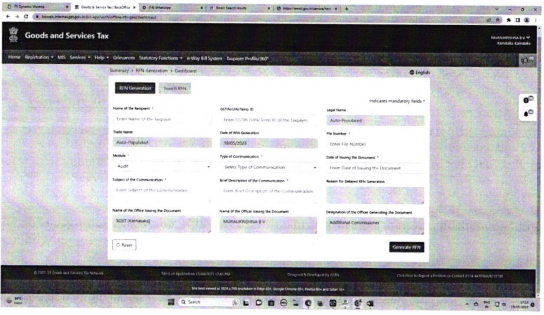
i. The Tax Officer has to navigate to Services > RFN Generation, the RFN Generation page is displayed.
ii. RFN can be generated by entering appropriate details in the fields and clicking on Generation RFN button. This RFN shall be mentioned in the communication to the taxpayer.
iii. The RFN generation page looks as under :
Guidance to taxpayers:
i. The taxpayers can verify the RFN of the physically generated document/offline communication made by the Tax Officer on the GST common portal, both pre and post login, by navigating to Services > User Services > Verify RFN option.
The guidelines under this circular are procedural in nature and hence cannot be made use of in interpretation of provision of the law.
Instructions issued in the circular shall be followed scrupulously by all the officers and any violation or deviation will be viewed seriosly.

Share this content: